How signing in works
Simran has no passwords. You sign in with Apple, with Google, or with a code we email you.
You'll see three options when you sign in or create an account:
- Continue with Apple uses your Apple ID. It is only on iPhone.
- Continue with Google uses your Google account, on iPhone or Android.
- Continue with Email sends a 6 digit code to your email. Type it in and you're signed in.
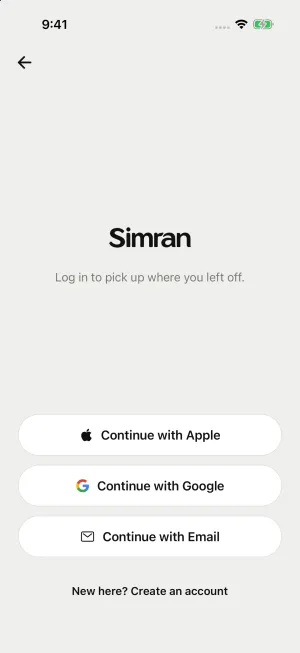
Each option is a separate way in. Your account belongs to the option you used to create it, so always sign in the same way.
Forgot your password?
There isn't one to forget. Sign in the same way you did before. If you used email and the code doesn't arrive, check your Spam and Promotions folders, make sure the address is typed correctly, and wait a minute before asking for a new code.
Using Simran without an account
You can skip signing up and use Simran as a guest. A guest's progress is saved only on that phone, so it's lost if you delete the app or change phones. Create an account to keep it safe.
Still need help?
We read every message. Include the ID from the bottom of Settings in the app so we can find your account quickly.
Write to us